
To advertise on Google, prepare your business account and landing page, define the outcome to measure, and configure the campaign type, targeting, keywords, advertisements and budget. Test the journey before submitting the campaign and check its delivery status afterwards. This guide focuses on Search campaigns for SMEs and service businesses, including a hypothetical UK business example.
Google advertising also covers YouTube, Shopping and other formats. Screen names and setup order vary by account and product updates. This is a practical setup guide, not a sales guarantee. Start with Google Ads basics if you are new to the terminology.
Download the Google Ads campaign planning template
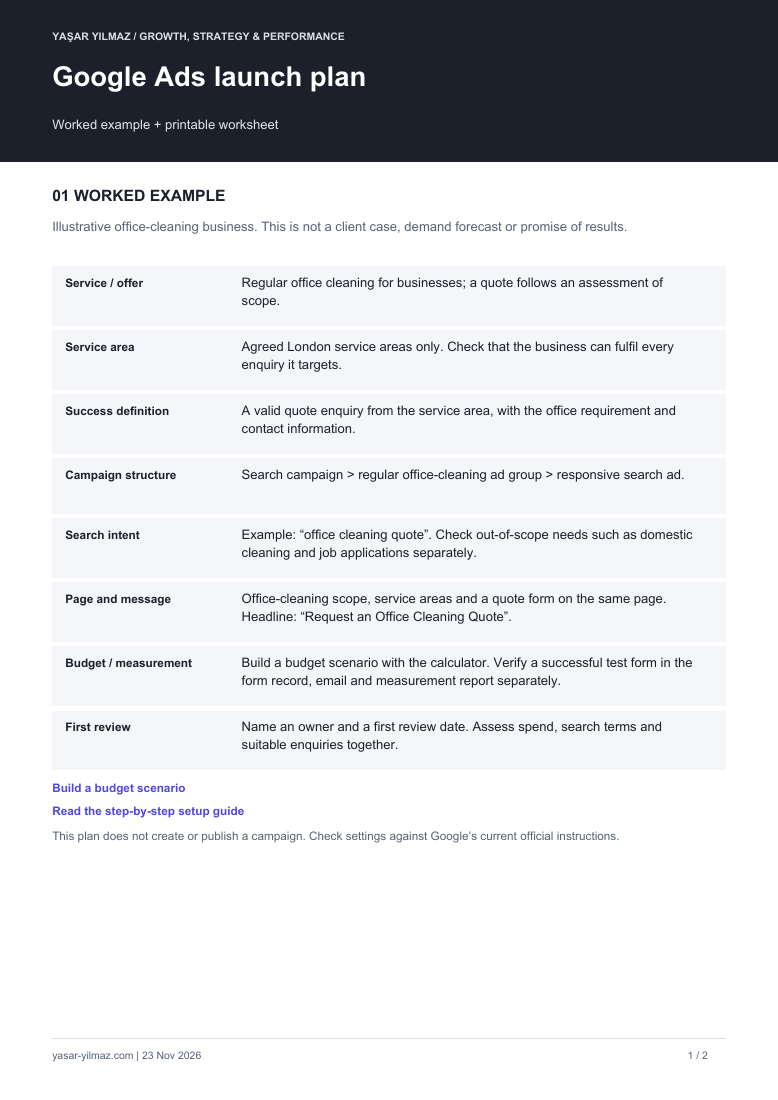
Put your service, coverage area, definition of a valid enquiry and measurement checks into one plan before opening the setup workflow. The two-page PDF combines a worked example for a hypothetical office-cleaning business with a printable worksheet for your own campaign.
- A worked plan covering the offer, area, search intent, message and review process.
- Blank planning fields for the landing page, budget scenario and responsible owner.
- A pre-launch checklist for form recording, email delivery, measurement, targeting and mobile usability.
Download the campaign planning template (PDF, 2 pages)
Start with a budget scenario. If you would like support with setup or measurement, discuss your requirements. The worksheet does not create or publish a campaign in your account.
For the interface steps, use Google’s official Search campaign setup instructions. The image below previews the worksheet; it is not a Google Ads interface screenshot.
1. Prepare the business offer and account
Write one sentence explaining which service you provide, where you provide it and what the visitor should do. Prepare a working service page, an enquiry form, business-owned account access and an affordable spending limit. Select the country, currency and time zone for your own business rather than copying another account.
Hypothetical example: a regular office-cleaning business serves specific London areas. Its objective is a valid quotation request containing location, office needs and contact details. The service page explains coverage, scope and quotation steps. Track qualified enquiries, quotations and customers separately from total forms. This example is not a demand estimate or client case.
2. Define a real conversion
An enquiry-led business and an online shop need different success definitions. A campaign objective in the interface does not replace the business definition. Before launch, test successful form submission, the stored record and the email notification separately. A button click is not a completed enquiry. Review primary and secondary conversion actions, campaign goals and duplicate counting. If a form and report disagree, follow the conversion tracking checks.
Is a campaign the same as an advertisement?
A campaign sets the budget and targeting framework. An ad group organises related searches and advertisements. An advertisement contains the message and destination seen by the user. Example: “London Office Cleaning” campaign → “Regular Office Cleaning” ad group → responsive search ad. Editing a message does not require a new account or campaign each time.
3. Create a Search campaign
In your account’s Campaigns area, choose the new campaign option and an appropriate objective and Search campaign type. Review the conversion goals used by the campaign. Use a clear management name such as “Office Cleaning | London | Search”. A keyword in an internal campaign name does not itself improve performance. Follow Google’s setup instructions if your account presents a different starting flow, and distinguish drafts from published campaigns.
4. Match location, language and networks to the service
Target areas you can genuinely serve. Check whether location settings include people present in the area or people showing interest in it. Remote consulting and on-site cleaning require different decisions. Location signals are imperfect, so record the location of real enquiries as well. Align ad and landing-page language with the audience. Review Search partners and Display Network options consciously; neither enabling every network nor imposing identical settings on every account is universally correct. Assess traffic and enquiry quality afterwards.
5. Group keywords by search intent
High search volume does not automatically mean suitable customers. “Office cleaning quote”, “cleaning jobs” and the broad word “cleaning” express different needs. These are intent examples, not measured keyword-volume recommendations. Group closely related needs and separate distinct services where appropriate. Choose match types with the bidding approach, measurement quality and actual queries in mind. Broad match is not inherently a mistake. Add negative keywords for needs you do not serve, rather than copying an unreviewed list.
6. Prepare the advertisement and landing page together
Explain the service, coverage and next step clearly. Avoid unsupported “best”, guaranteed results or price claims. The landing page should substantiate the ad’s offer. Check assets and mobile previews. In an existing Search campaign, open the Ads area, create a responsive search ad and select its ad group; new-campaign workflows may show this step directly.
- Final URL: a working, relevant service page.
- Display paths: short labels alongside the address; they do not replace the final URL.
- Headlines and descriptions: useful, distinct messages that also make sense in different combinations.
- Preview and save: inspect combinations. A preview does not guarantee the same appearance in every search.
Responsive search ads support 3–15 headlines of up to 30 characters each, 2–4 descriptions of up to 90 characters each, and two display paths of up to 15 characters each. These are field limits, not performance targets; consult the linked official specification for changes.
Illustrative English advertisement
| Field | Example | Characters / limit |
|---|---|---|
| Headline 1 | London Office Cleaning | 22 / 30 |
| Headline 2 | Regular Cleaning Service | 24 / 30 |
| Headline 3 | Request an Office Quote | 23 / 30 |
| Description 1 | Explore our service areas and office cleaning scope. Request a tailored quote. | 78 / 90 |
| Description 2 | Share your office location and cleaning needs so we can discuss the right scope. | 80 / 90 |
| Display path 1 | office | 6 / 15 |
| Display path 2 | cleaning | 8 / 15 |
This is a hypothetical teaching draft, not a live customer advertisement or Google screenshot. Use your real service URL and substantiate coverage and scope. Prepare additional distinct copy where useful. Test the form record and notification before launch, and use the landing-page checklist.
7. Choose a budget and bidding approach
Separate media spend from setup and management fees. Assess expected click costs, enquiry conversion and customer economics in the target market. There is no universal starting budget or bid strategy. For most campaigns, a constant average daily budget gives a monthly spending limit of 30.4 times that budget, while daily spend can reach twice the average daily budget. Exceptions and budget changes require checking Google’s budget rules.
Use the budget calculator to estimate required spend from an enquiry target or estimate enquiries from a fixed budget. Compare cost scenarios rather than treating an assumption as a forecast or sales promise.
A worked SME campaign plan
| Decision | Hypothetical office-cleaning plan |
|---|---|
| Structure | One Search campaign and an office-cleaning ad group, covering districts the business can serve. |
| Searches and copy | Start with service-relevant needs such as quotation requests. Check home-cleaning queries if that service is unavailable. |
| Landing page | Service scope, coverage and quotation form on a usable mobile page. |
| Budget and launch | Set a bounded test scenario. Verify form record, notification and measurement separately. |
| First review | Compare the search terms report with valid and qualified enquiries. If clicks rise without suitable requests, investigate intent, form and tracking first. |
Pre-launch checklist
- Service, area and success definition documented.
- Campaign and ad-group goals aligned.
- Successful form record, email and measurement event tested independently.
- Duplicate conversions and incorrect primary goals reviewed.
- Location, language, networks, dates, budget and billing checked.
- Relevant keywords separated from unserved needs.
- Final URLs open the correct service page.
- Mobile landing page and form work.
- Account review, payment and policy messages addressed.
- Launch owner, first review and spending monitoring agreed.
Submission does not mean an ad will immediately appear in every search. Resolve delivery blockers first and read approval and eligibility notices. Do not repeatedly search for and click your own advertisement.
Campaign management after launch: data → check → decision
| Observed situation | First checks | Decision |
|---|---|---|
| No delivery | Campaign, ad and keyword status; billing and policy messages | Resolve the delivery blocker before raising the budget. |
| Clicks without enquiries | Successful test form, tracking, search intent and mobile page | Fix technical failure or message mismatch. |
| Enquiries but few suitable prospects | Search terms, service area, requested need and duplicate records | Separate irrelevant demand without cutting suitable searches. |
| Qualified enquiries but few sales | Response time, quotation follow-up, sales cycle and customer contribution | Review the sales process and acquisition cost together. |
| Suitable results and proposed scaling | Measurement reliability, follow-up window, service capacity and margins | Build a new budget scenario and record the change. |
Report spend, clicks, valid enquiries, qualified enquiries, quotations and won customers for the same service and period. Record the date and reason for changes. Allow for conversion and sales delays when comparing recent leads with completed periods. Investigate technical failures or clearly irrelevant spend promptly; do not rebuild everything because of one weak day. Read the search terms guide and the troubleshooting guide.
In my Chase Lodge case, service departments, account structure and phone/form measurement were considered together. The lesson is to build a measurable service-level structure rather than judge all services through one aggregate number.
Frequently asked questions
Should I create a new campaign or edit an existing one?
A new campaign creates a separate budget and settings framework. A copy or keyword adjustment may fit the existing structure. Assess separate budget or targeting needs before creating another campaign merely because results are weak.
Does saving an ad make it live immediately?
No. Review status, enabled campaign and ad-group settings, schedule and account conditions also affect delivery.
Do I need a consultant?
No. You can manage the account yourself. Compare support scope if you need help with setup, measurement, budget decisions or ongoing review.
Is campaign creation free?
Preparing a campaign and spending money on delivery are different. Advertising charges follow the campaign’s billing model; external setup or management services are a separate cost.
Does advertising improve organic ranking?
Buying advertising does not buy organic ranking. Assess SEO and paid advertising according to your needs, budget and timescale.
Discuss the setup
Share your priority service, target region and whether an account already exists. We can clarify setup, measurement review or ongoing support through the service scope and an initial discussion.